Quick Answer: To run Google Ads on Shopify, install the Google & YouTube channel from the Shopify App Store, connect Google Merchant Center, sync your product feed, then launch a Performance Max campaign alongside a Brand Search campaign. Most new accounts should stay on Standard Shopping plus Brand Search until they cross 50 conversions a month, then move into a segmented PMax structure. The single biggest point of failure is conversion tracking: a large share of Shopify accounts have broken or incomplete tracking on the order confirmation page, which means every dollar spent afterward is a guess.
Shopify makes it easy to get a campaign live in an afternoon. It does not make it easy to get a campaign that actually works. The setup wizard walks you through connecting Merchant Center and clicking “publish,” and 20 minutes later you have a Performance Max campaign spending real money on a feed nobody checked and a tracking setup nobody verified.
This guide covers what to do instead: the setup sequence in the right order, the campaign structure that holds up past the first few weeks, and the mistakes that quietly burn budget for months before anyone notices.
Why Shopify Needs Its Own Playbook
Generic Google Ads advice assumes you are building campaigns keyword by keyword. Shopify stores work differently. Your product feed is the campaign brief. Everything Google shows, the images, prices, titles, availability, comes from that feed, not from ad copy you write by hand.
That changes where the leverage is. A Shopify store’s biggest lever usually is not bid strategy or ad copy. It is feed quality, and the store’s structure decisions around it: how you segment products, when you turn on Performance Max, and whether your tracking is actually catching every purchase.
The Setup Sequence
Do these in order. Skipping ahead to campaign creation before the earlier steps are solid is the most common way Shopify accounts end up wasting the first month of spend.
- Install the Google & YouTube channel from the Shopify App Store. This is the connector between your store and Google’s advertising products.
- Connect Google Merchant Center. Verify your domain and authorize the feed sync. Shopify’s product data will overwrite anything you edit directly in Merchant Center, so make catalog changes in Shopify, not in Google’s interface.
- Let the feed sync. This typically takes between one and 24 hours depending on catalog size. Do not launch campaigns until the sync completes and Merchant Center shows your products as approved rather than pending.
- Connect Google Ads and Google Analytics 4 through the same channel, so conversion data flows correctly from day one.
- Verify conversion tracking is firing on the order confirmation page. Not the cart page, not the checkout page, the actual confirmation page a customer sees after paying. This is the step most accounts skip, and it is the one that matters most.
That last step deserves extra weight. Without accurate conversion tracking, Shopping and Performance Max campaigns cannot optimize toward anything real. Google Ads and Merchant Center will both keep reporting data, but the data will not reflect what is actually happening in your store, and every budget decision built on it will be wrong.
Campaign Structure: What Actually Works
If you’re under 50 conversions a month
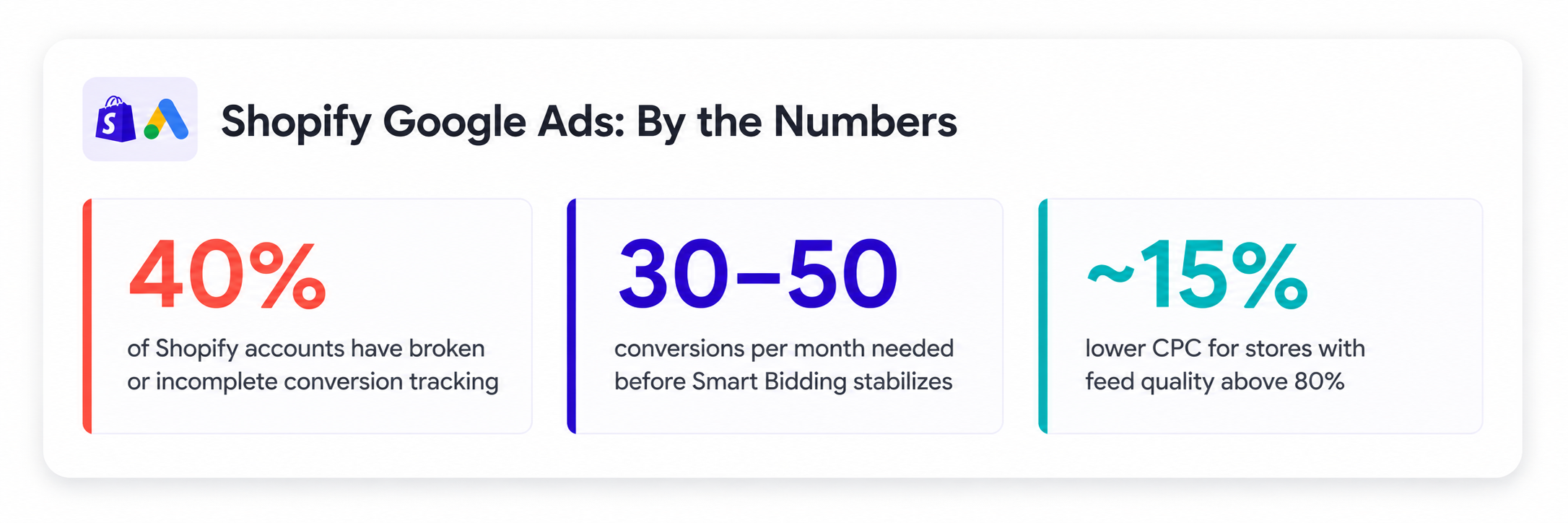
Start simple: one Brand Search campaign to defend your store name at low cost, plus Standard Shopping. Performance Max needs volume to learn from, generally 30 to 50 conversions per campaign per month before Smart Bidding stabilizes. Below that threshold, PMax is often working with too little signal to make good decisions, and Standard Shopping’s more manual controls let you steer things directly while the account builds a track record.
Once you have volume
Performance Max becomes the default for most stores at this stage, because it can pull from Shopping, Search, Display, YouTube, and Discover simultaneously using a single campaign and your product feed as the input. But the default single-campaign setup that Shopify’s wizard nudges you toward is rarely the right long-term structure once a catalog has any real breadth.
The stronger approach segments Performance Max by a strategic dimension, most commonly margin tier or product category, implemented through custom labels in your feed:
- High-margin products: their own PMax campaign, aggressive bidding, since a wasted click costs relatively little against the margin
- Medium-margin products: a target ROAS approach, balancing spend against return
- Low-margin or clearance products: conservative bidding, or excluded from paid campaigns entirely if margin cannot support the CPC
Standard Shopping still earns a place alongside PMax even once you have scaled, particularly for brand defense and high-margin lines where you want direct control over bids and the ability to add negative keywords, something Performance Max does not expose in the same way.
Whatever structure you land on, give it real time before judging it. Every structural change, adding a campaign, changing bid strategy, resegmenting asset groups, resets some or all of the Smart Bidding learning period. Making three changes at once makes it impossible to know which one helped or hurt.
Feed Quality Is an Ongoing Lever, Not a Setup Task
 Sources: COREPPC, Black Belt Commerce, Adgenix (2026 data)
Shopify stores that treat their product feed as something you configure once at launch tend to plateau. The stores that keep improving treat feed quality as continuous work:
- Product titles should be specific and front-load the terms shoppers actually search, not just your internal product naming convention
- GTINs (Global Trade Item Numbers) should be present wherever they exist. Missing GTINs limit which surfaces Google will show your product on
- Images need to be at least 800×800 pixels, with the product filling most of the frame on a clean background, no text overlays or promotional graphics on the primary image
- Custom labels should reflect the segmentation you actually use for campaign structure, margin tier, seasonality, bestseller status, so PMax can be split meaningfully
Feed quality has a measurable effect on cost efficiency: accounts with strong feed health consistently see lower CPCs than accounts running a feed that’s never been touched since launch.
The Mistakes That Quietly Cost the Most
Broken or partial conversion tracking. This is by far the most common issue found in Shopify account audits, and it is the one that invalidates everything downstream. If the order confirmation page tag is not firing correctly, every optimization decision after that point is built on incomplete data.
Launching Performance Max before the account has any conversion history. PMax without enough data to learn from tends to spend inefficiently while it searches for signal it does not have yet.
Running one flat PMax campaign across a broad, mixed-margin catalog. This is the default the Shopify wizard sets you up for, and it is the setup most likely to overspend on low-margin products while underinvesting in the ones that actually make money.
Treating the feed as finished after setup. A feed that was accurate at launch drifts as inventory, pricing, and availability change. Stale feed data shows up as wasted impressions on out-of-stock or discontinued products.
Where Automation Helps
Manually maintaining margin-tier segmentation, watching feed health, and catching tracking drift is real, recurring work, the kind that’s easy to fall behind on once a store has more than a handful of product categories. This is the exact gap Optimyzee’s WooCommerce and Shopify integrations are built to close: catalog sync stays live automatically, asset groups and ad copy generate from actual product data instead of a template, and wasted spend gets flagged before it compounds across a full month of campaigns. It is not a replacement for understanding the structure above, it is what applying that structure looks like without doing it by hand every week.
FAQ
How long does it take to set up Google Ads for a Shopify store?
The connection and feed sync itself takes under an hour of active work, though the feed sync can take up to 24 hours to fully process, and Merchant Center review typically takes three to seven days for a store with clean, policy-compliant listings. Budget roughly a week from starting the setup to having fully approved, live campaigns.
Should I use Performance Max or Standard Shopping?
Standard Shopping if you are under 50 conversions a month or want direct bid and negative keyword control. Performance Max once you have enough conversion volume for Smart Bidding to learn from, ideally alongside a Brand Search campaign either way.
What’s a reasonable starting budget?
Enough to reach the 30 to 50 conversions per campaign per month threshold within a reasonable window. The right number depends heavily on your average order value and conversion rate, there is no universal daily figure that works across different stores.
How long until results stabilize?
Expect a two to four week learning period after launch, and expect it to reset, partially or fully, after any significant structural change. Resist judging a new structure before it has had time to exit that learning phase.
The Bottom Line
Shopify makes launching a campaign fast. It does not make launching the right campaign fast, that still takes deliberate structure: sequencing the setup correctly, choosing PMax segmentation over a single flat campaign, and treating the feed as ongoing maintenance rather than a one-time task. Get conversion tracking right first. Everything else optimizes on top of that foundation, or compounds the same mistake if it is missing.