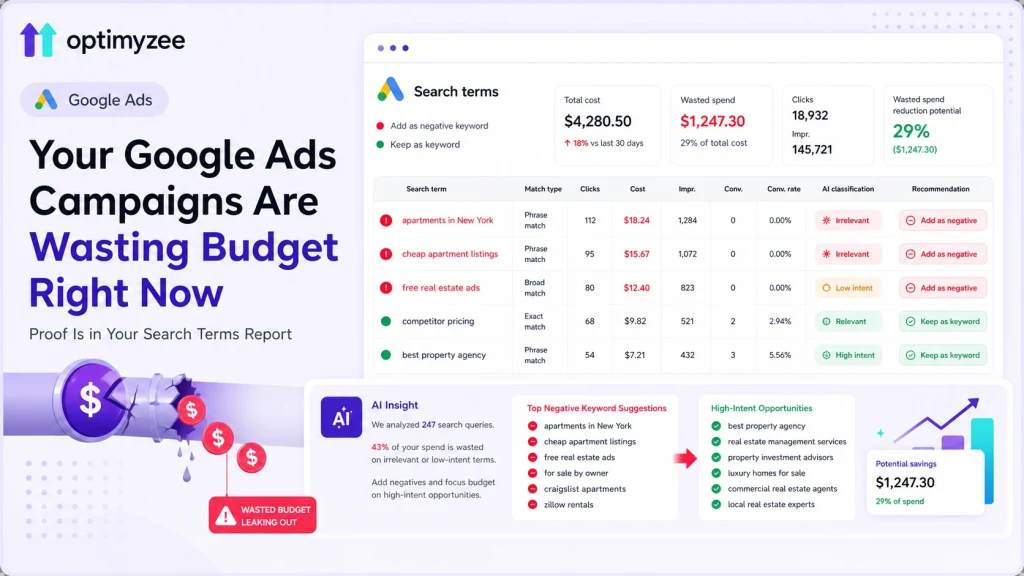
Quick Answer: Industry data shows that 15–50% of Google Ads spend goes to irrelevant search queries in the average account. This happens because your keywords tell Google what you want to target, but search terms – the actual queries users type – can be very different. As Google’s AI match types expand, the gap between keyword and reality is getting wider, not narrower. This post explains exactly what’s happening, how to find the waste in your account, and how AI can do the analysis in minutes instead of hours.
Most accounts have real google ads wasted spend hiding in plain sight. You set up your Google Ads campaigns carefully. You chose the right keywords, wrote relevant ad copy, set up conversion tracking. And then you checked your reports and the numbers look… reasonable. Cost per click is fine. Impressions are solid. Some conversions coming in.
But here is what most advertisers never look at closely enough: the Search Terms Report. Not the keywords you chose – the actual queries your ads showed for. What real people typed into Google right before they clicked your ad.
When you look at that data with fresh eyes, what you often find is uncomfortable. Your ad for ‘commercial cleaning services London’ showed for ‘how to clean office carpets yourself’. Your B2B software ad appeared for ‘free project management tools for students’. Your real estate campaign triggered on a competitor’s brand name thirty-seven times last month.
None of these clicks were going to convert. All of them cost money. And in most accounts, this pattern repeats across hundreds of queries, week after week.
The Keyword vs Search Term Gap: Why It Matters More Than Ever
The confusion between keywords and search terms is the most expensive misunderstanding in paid search. They sound similar. They are not.
Keywords are the terms you select in Google Ads to tell the platform what queries to target. They are your instructions to Google.
Search terms are what users actually typed into Google before seeing your ad. They are what Google decided to match to your keywords.
The gap between those two things has always existed. But in 2026, it is wider than it has ever been. Here is why:
-
- Broad match has become Google’s default recommendation, and broad match in 2026 means your keywords can match to semantically related queries that may have little commercial connection to what you sell
-
- Close variant matching means even Exact match keywords now trigger for queries Google considers ‘equivalent in meaning’
-
- Performance Max campaigns provide limited visibility into which search queries triggered your ads – you see categories, not individual terms
-
- Google’s own data shows it hides a growing share of search term data under privacy thresholds – Search Engine Land estimates this could affect up to 85% of query data in some accounts
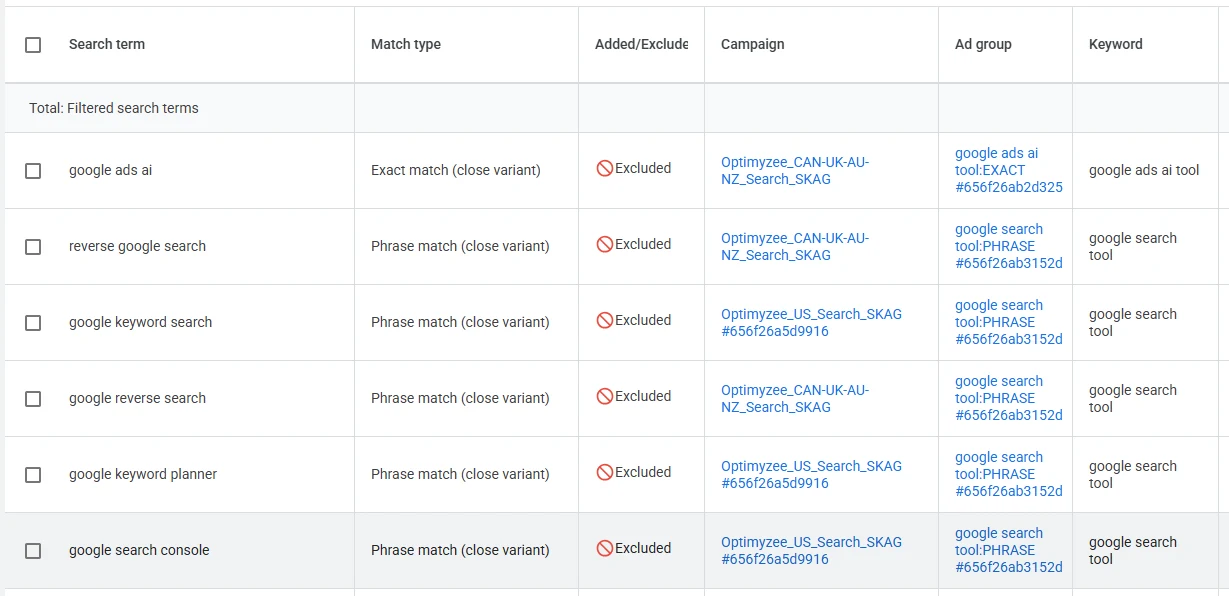
The practical result: for most accounts, a significant portion of budget is spent on queries the advertiser would reject if they saw them. Industry analyses consistently find that 15–30% of budgets go to irrelevant clicks in accounts that never review search terms. For accounts using broad match without active negative keyword management, the figure reaches 30–50%.
Sources: navoto.com Google Ads Benchmarks 2026, clicksgeek.com Wasted Ad Spend Audit Guide, get-ryze.ai ‘Google Ads Budget Depleting Fast’ (April 2026)
The Five Types of Wasted Search Term Traffic
Not all wasted spend looks the same. Understanding the categories helps you
prioritize
where to act:
1. Irrelevant queries (Negatives)
Queries with no commercial connection to your product. ‘How to do X yourself’ when you sell a professional service. ‘Free’ when you have no free tier. Job-seeker queries (‘X jobs London’) when you sell to businesses. These should be added as negative keywords immediately.
2. Competitor brand queries
Your ads triggering on searches for your competitors’ brand names. This is a strategic decision – sometimes you want to bid on competitor terms, often you don’t. But the key word is decision. If your competitor terms are triggering through match type expansion without any intentional strategy, you’re paying for traffic with unpredictable intent.
3. Underperforming queries worth adding as keywords
The opposite problem: queries that are highly relevant and generating clicks, but not formally in your keyword list. They are being matched through broad or phrase match without the priority, bid precision, or dedicated ad copy they deserve. Promoting these to explicit keywords often improves Quality Score and reduces CPC.
4. Brand queries you haven’t claimed
Your own brand name appearing in search terms, matched through non-brand campaigns. This means you’re paying general campaign rates for branded traffic that could be handled by a dedicated brand campaign at a lower CPC.
5. Observe territory – relevant but low data
Queries that appear related to your business but have too few clicks or impressions to make a confident decision. These need monitoring rather than immediate action.
📌 In a real account analysis across 71 search queries from a California based printing company campaign, Optimyzee’s AI
categorized
: 4 negatives (irrelevant spend), 0 new keyword worth adding, 37 queries to observe, 3 brand queries, and 27 competitor queries. Every single classification came with a plain-English reasoning: exactly what the query means, why it was
categorized
that way, and what the recommended action is.
Why Manual Search Term Review Doesn’t Scale
Every Google Ads guide tells you to review your search terms weekly. Almost no one does. Here is why:
-
- A mid-sized Search campaign generates 200–500 new search term impressions per week
-
- Reviewing 300 queries manually – reading each one, assessing intent, cross-referencing your product, making a decision – takes 2–4 hours
-
- That is 8–16 hours per month, per campaign
-
- For an agency managing 20 client accounts, that is 160–320 hours of analyst time monthly – on a single task
And that assumes the analyst has full context on every client’s business, competitive landscape, and strategic intent at all times. In practice, review quality degrades as time pressure increases. Borderline queries get ignored. Edge cases like competitor terms get left in ‘observe’ mode indefinitely.
🔥 The math is unfavorable: the average analyst reviews search terms for 30–60 minutes per account per month, which means only the most expensive or obviously irrelevant queries get attention. The moderate-spend irrelevant queries – each individually small, collectively significant – accumulate unnoticed.
What AI-Powered Search Term Analysis Actually Does
AI changes the economics of search term review entirely. Instead of an analyst spending hours assessing intent for each query, a language model that understands business context, search intent, and competitive dynamics can assess 247 queries in under 10 minutes – with a reasoning note for each one.
This is not just faster. It is qualitatively different in several ways:
-
- Context at scale:
AI can apply consistent context across every query simultaneously, rather than the degrading attention quality of a human reviewing query number 180 after 90 minutes.
-
- Intent classification:
language models are trained on vast amounts of text and can distinguish between commercial intent, informational intent, navigational intent, and competitor research with high accuracy across languages and query structures.
-
- Reasoning transparency:
unlike a simple rule-based filter, AI can explain why a query was flagged – ‘Arshakunyats appears to be a competitor residential complex in Yerevan. 2 clicks, 2 impressions, 0 conversions. Low data confidence. Could capture competitor interest but mixed relevance. Observe.’ That reasoning is actionable and educational.
-
- Multilingual analysis:
search terms in any language or script are assessed on their meaning, not their character set. Armenian-language queries in a real estate campaign are understood and classified correctly.
Introducing Optimyzee’s Search Terms AI Optimizer
We built Search Terms AI Optimizer as a direct response to this problem – the gap between what advertisers know they should do (review search terms regularly and thoroughly) and what is actually possible given time constraints.
The workflow is simple:
-
- Connect your Google Ads account – the tool pulls directly from your live data via the Google Ads API
- Select the campaign you want to
analyze
-
- The AI runs: collecting search terms, checking relevance and intent, preparing recommendations
- Results appear in a
categorized
-
- view: Negatives / Keywords / Observe / Brand / Competitor
-
- Each query shows: Relevance, Intent, Confidence, Performance, and a plain-English Reasoning
-
- Select the queries you want to act on and publish directly to Google Ads – as negatives or as new keywords – in one click
The analysis that would take 3–4 hours of manual work completes in under 10 minutes. The output is not a spreadsheet you need to interpret – it is a
categorized
recommendation list with reasoning you can accept, override, or learn from.
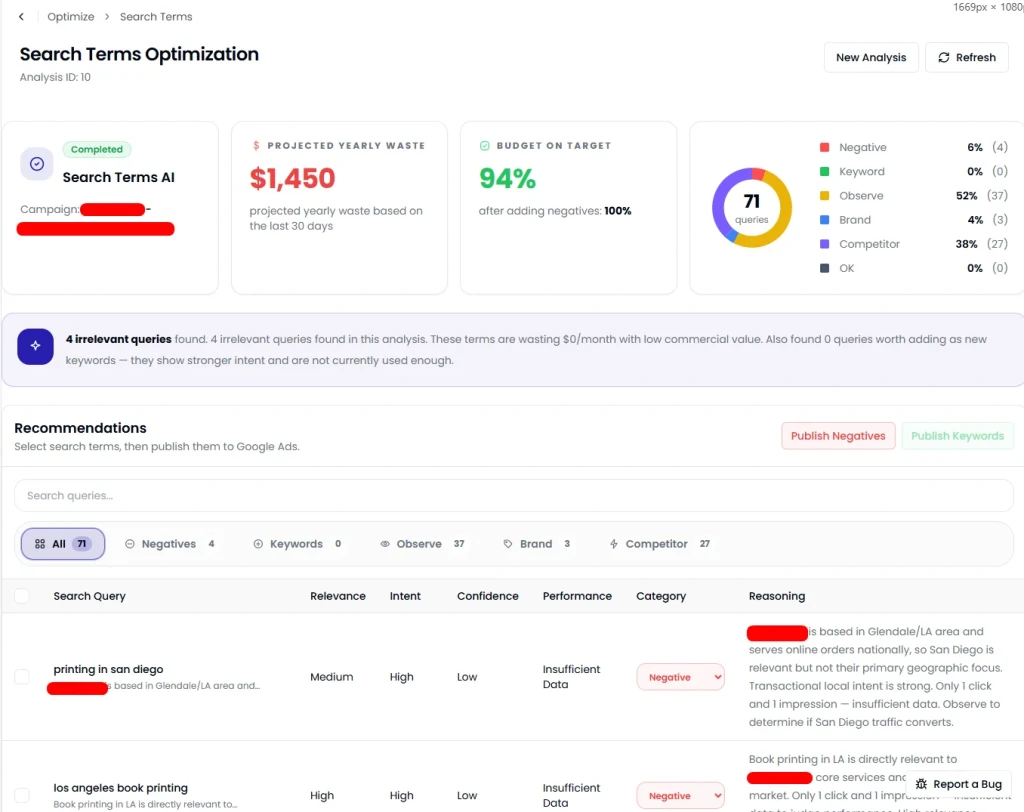
💡 From the live tool: the summary dashboard shows Projected Yearly Waste in dollars, Budget on Target percentage after implementing recommendations, and the full distribution of query categories. For the “Project” campaign in testing, 71 queries were
analyzed
with $1,450 projected yearly waste after recommendations applied and budget efficiency at 94% after negatives.
How Search Term Analysis Fits Into Your Optimization Workflow
The most effective cadence for using AI-powered search term analysis:
-
- Week 1–2 after campaign launch:
run the analysis twice. New campaigns accumulate irrelevant queries quickly before negative keyword lists are established. Catching these early prevents budget waste from compounding.
-
- Monthly for established campaigns:
run once per month as part of your standard account maintenance. The AI identifies new irrelevant terms that have appeared since your last review, and flags any emerging patterns – new competitor terms, new informational queries, shifting search behaviour.
-
- After any match type expansion:
if you switch from phrase/exact to broad match, or enable AI Max for Search, run an immediate analysis. The expanded matching will surface a new set of queries that need review.
-
- After Google algorithm updates:
match type behaviour can shift with algorithm updates. A post-update search term audit is standard practice for accounts with significant spend.
FAQ
What is the difference between a keyword and a search term in Google Ads?
A keyword is the term you select in Google Ads to tell the platform what types of searches to target. A search term is the actual query a user typed into Google before seeing your ad. Google uses your keywords to match to search terms, but because of broad match, close variants, and smart matching, the actual queries your ads show for can be quite different from the keywords you chose. The Search Terms Report is where you see what users actually searched for.
How much budget am I likely wasting on irrelevant search terms?
It depends heavily on your match type strategy, how recently you last reviewed search terms, and how established your negative keyword list is. Industry benchmarks suggest 15–30% waste in accounts with minimal negative keyword management, and up to 50% for accounts using broad match without active monitoring. The only way to know your specific figure is to run a search term analysis – the projected waste calculation in Optimyzee’s tool shows this as a dollar figure based on your actual spend.
Can the tool publish negative keywords directly to my Google Ads account?
Yes. Once you identify search terms you want to exclude, you can select them and click ‘Publish as Negatives’ – the tool sends them directly to your Google Ads account via the API. Similarly, high-performing search terms worth promoting to explicit keywords can be published with ‘Publish as Keywords’. No manual copying, no CSV export, no waiting.
Does it work for Performance Max campaigns?
PMax campaigns provide limited search term data by design – Google shows search categories and a sample rather than the full query list. The tool works with the data Google makes available. For standard Search campaigns, full query-level data is available and the analysis is most comprehensive.
How often should I run a search term analysis?
For active campaigns, monthly is the minimum effective cadence. Weekly is better for high-spend or newly launched campaigns where irrelevant queries accumulate faster. The time investment is minimal – under 10 minutes per campaign – so more frequent review is practical in a way that manual analysis is not.
The Bottom Line
Search term analysis is the highest-ROI routine task in Google Ads account management. Blocking irrelevant queries directly reduces wasted spend. Adding high-performing queries as keywords improves Quality Score and reduces CPC. Identifying competitor and brand patterns informs campaign strategy.
The reason most accounts don’t do it consistently is not lack of knowledge – it is time. A task that takes 3–4 hours per campaign per month, multiplied across an account portfolio, is simply not sustainable manually.
AI makes it sustainable. Not by replacing the strategic decisions about what to do with each query, but by doing the time-consuming work of reading, interpreting, and classifying hundreds of queries so that you spend your time on the decisions that actually require judgment.
→ Connect your Google Ads account and see your search term waste analysis in under 10 minutes. Optimyzee’s Search Terms AI Optimizer is free to try.
Sources
navoto.com: ‘Google Ads Benchmarks: Metrics & Industry Averages‘ – 15–30% budget waste from ignoring search terms
clicksgeek.com: ‘Stop Wasted Ad Spend On Google Ads: Audit Guide 2026‘ – 30–50% waste figure for local businesses
get-ryze.ai: ‘Google Ads Budget Depleting Too Fast? How to Fix (2026)‘ – 73% of accounts waste 30–50% of budget
marlinsem.com: ‘How Much Search Term Data is Google Ads Hiding from You?‘ – 85% hidden query estimate
groas.ai: ‘Where Your Google Ads Budget Is Actually Being Wasted In 2026‘ – wasted spend analysis
Optimyzee: Live Search Terms AI Optimizer analysis – “Project X” campaign, 71 queries, May 2026