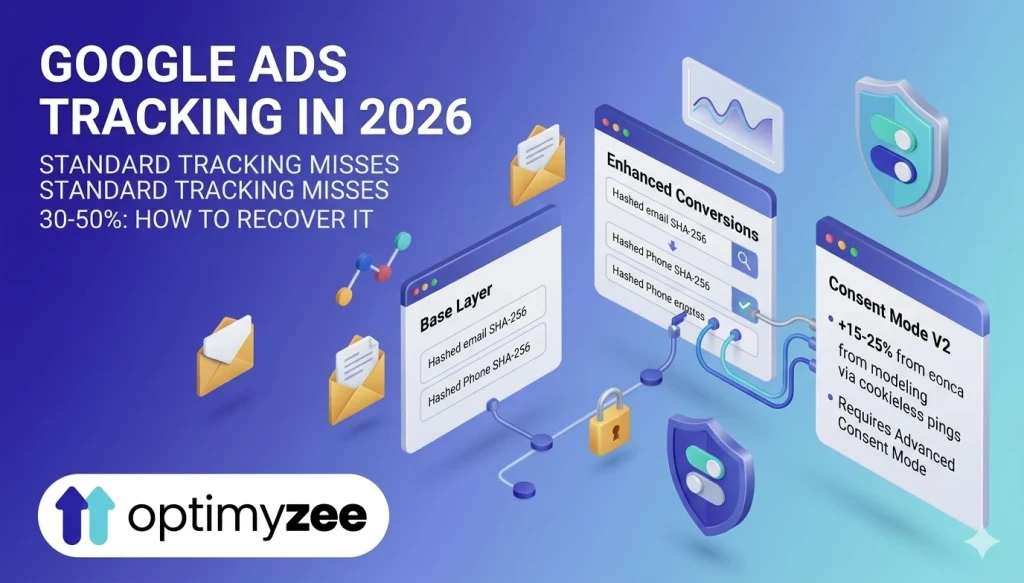
Standard Google Ads conversion tracking misses 30–50% of actual conversions in 2026 due to cookie restrictions and privacy changes. Enhanced Conversions recovers 5–30% of those lost attributions. Consent Mode V2 recovers another 15–25% via AI modelling. Without both, your Smart Bidding algorithm is optimising on incomplete data – and you’re making budget decisions based on a fraction of reality.
Most guides to Google Ads conversion tracking focus on campaign structure, bidding strategies, keyword selection, and ad copy. These things matter. However, there is a layer underneath all of them that determines whether any optimization effort will actually work – and it is the layer most often set up incorrectly, partially, or not at all.
Conversion tracking is the foundation. Google’s Smart Bidding, AI Max, Performance Max, and every automated bidding strategy in the platform work by optimising toward the conversion signals you provide. Feed the system accurate data, and it learns quickly. Feed it incomplete or wrong data, and it confidently optimises toward the wrong outcome – usually at scale, and usually expensively.
In 2026, the gap between advertisers with solid tracking and those without has grown significantly. Cookie restrictions in Safari and Firefox, GDPR enforcement in Europe, and the ongoing shift away from third-party cookies have made standard conversion tracking materially less accurate than it was three years ago. This guide explains what the current landscape looks like, what tools exist to close the gap, and how to audit and improve your setup.
Why Standard Google Ads Conversion Tracking Is No Longer Enough
Standard Google Ads conversion tracking works by placing a cookie on a user’s browser when they click your ad. When they later complete a conversion on your site, the cookie fires and Google attributes it to your campaign.
This mechanism has three significant failure points in 2026:
Cookie blocking. Safari blocks third-party cookies by default. Firefox does the same. Together, Safari and Firefox account for approximately 35–40% of web browsing globally. For many advertisers, this means over a third of conversions are invisible to standard tracking from the moment they happen.
Cross-device behaviour. A user clicks your ad on mobile, then converts on desktop three days later. The cookie from the mobile click does not transfer to the desktop session, so the conversion goes unattributed. According to research tracked by PPC Mastery, cross-device journeys now account for a substantial and growing share of B2B and high-consideration purchase paths.
Consent denial in Europe. Since March 2024, Consent Mode V2 has been mandatory for advertisers serving users in the EEA and UK. Cookie Script research shows that globally, only 31% of users accept tracking cookies on average – meaning nearly 70% of your European traffic is invisible to traditional tracking without additional configuration.
🚨 A business running Google Ads without Enhanced Conversions and Consent Mode is making bidding and budget decisions based on 50–70% of their actual conversion data. Smart Bidding will still optimise – but toward an incomplete and distorted picture of performance.
Sources: Cookie Script research (cookie consent acceptance rates, 2025), PPC Mastery Measurement Maturity Framework, Dataslayer.ai Consent Mode V2 guide (2025)
The Three-Layer Tracking Stack for 2026
A complete conversion tracking setup in 2026 consists of three layers, each solving a different part of the measurement problem:
- GA4 + Google Ads link – the baseline data layer
- Enhanced Conversions – recovering cookie-blocked and cross-device conversions
- Consent Mode V2 – modelling conversions from users who declined tracking
Each layer builds on the previous one. Skipping any layer leaves a gap in the data your bidding algorithms depend on.
Layer 1: GA4 + Google Ads – The Foundation
Before anything else, your Google Analytics 4 property and Google Ads account need to be properly linked and importing the right conversion events.
What to verify:
- GA4 and Google Ads are linked in both platforms (Admin → Product Links → Google Ads in GA4; Tools → Linked accounts in Google Ads)
- Auto-tagging is enabled in Google Ads – this is what passes the GCLID parameter that connects ad clicks to GA4 sessions
- GA4 marks your key conversion events as ‘Key Events’ and imports them into Google Ads as conversion actions
- Attribution model is set to Data-Driven Attribution (DDA) – Google’s default and recommended model in 2026, which distributes credit based on actual engagement signals rather than arbitrary rules
- Conversion counting is correctly configured: ‘One’ for lead forms (one conversion per click), ‘Every’ for purchases (every transaction counts)
⚠️ One of the most common and damaging mistakes: importing the same conversion from both GA4 and a separate Google Ads tag, resulting in double-counting. Every conversion appears twice in reporting. Smart Bidding optimises toward inflated numbers and performance appears better than it is – until you check actual business outcomes. Mark only one source as ‘Primary’ per conversion action.
💡 If you are starting from scratch or auditing an existing setup: in Google Ads, go to Tools → Conversions and check which conversion actions are marked as Primary. Then check whether any of them import from multiple sources simultaneously.
Layer 2: Enhanced Conversions – Recovering Lost Attributions
Enhanced Conversions is, as groas.ai’s 2026 guide describes it, ‘the single most impactful improvement you can make to your conversion tracking accuracy.’ If you implement only one thing from this guide, this is it.
How it works
When a user converts on your site – fills out a form, makes a purchase, signs up – they typically provide first-party data: an email address, phone number, or postal address. Enhanced Conversions captures this data and hashes it using the SHA-256 algorithm, which makes it impossible to reverse-engineer back to the original. It then sends the hashed data to Google.
Google then attempts to match this hashed data against its own logged-in user database – people signed into Gmail, YouTube, Chrome, or any Google product. When there is a match, Google can attribute the conversion to the ad click that initiated the journey, even when:
- The user’s cookies were deleted between click and conversion
- The conversion happened on a different device than the one used for the ad click
- The conversion occurred days or weeks after the initial click
- The user was browsing in Safari or Firefox with aggressive cookie restrictions
What the data shows
Advertisers typically see a 5–30% increase in reported conversions after implementing Enhanced Conversions, according to multiple 2025–2026 studies. One PPC practitioner tracked in the PPC Mastery framework saw a 10% increase specifically on Search campaigns within 30 days. Growth Minded Marketing’s guide reports 15–30% more measured conversions within the first month of implementation.
As a result, this additional data directly improves Smart Bidding performance – the algorithm can now see a more complete picture of actual conversions and calibrate its signals accordingly.
How to verify it’s working
In Google Ads: Tools → Conversions → select your conversion action → Diagnostics tab. Look for ‘Enhanced conversions: Active’ status. Target: 50%+ of conversions should be enhanced. Below 30% means your implementation needs review.
📌 Enhanced Conversions requires that users actually provide personal data at conversion (email, phone, etc.) – which most lead gen and e-commerce forms do. If your conversion event is a page view or a button click with no user data attached, Enhanced Conversions cannot work for that event.
Sources: groas.ai ‘Google Ads Conversion Tracking Setup 2026’ (February 2026), PPC Mastery Measurement Maturity Framework, Growth Minded Marketing Enhanced Conversions guide (February 2026)
Layer 3: Consent Mode V2 – Modelling What You Can’t Directly Measure
Consent Mode V2 addresses a different problem from Enhanced Conversions: users who have actively declined cookie tracking. For these users, you cannot attribute individual conversions directly. Instead, you can give Google’s AI enough signal to model what those conversions likely were.
How it works
When consent is denied, Consent Mode sends cookieless ‘pings’ to Google – signals that a user interaction occurred, without any individual identifier. Google’s AI then analyses patterns from consented users to estimate conversion rates and values for the unconsented population, and incorporates these modelled conversions into your reporting and bidding signals.
Advertisers implementing Advanced Consent Mode (the version that sends cookieless pings) typically see a 15–25% uplift in reported conversions from modelling alone, according to Dataslayer.ai’s 2025 analysis. Combined with Enhanced Conversions, total recovery can reach 30–50% of previously invisible conversions.
Basic vs Advanced Consent Mode
Basic Mode: No tags fire until consent is granted. Zero data from non-consenting users. Simple to implement but sacrifices all modelling benefits.
Advanced Mode: Tags load before the consent banner appears and send cookieless pings regardless of consent decision. Google can model conversions from non-consenting users. Significantly more accurate. Recommended unless legal counsel has specific objections.
💡 For most advertisers, use Advanced Consent Mode. The accuracy improvement from cookieless pings is substantial and the privacy protections remain intact – no individual user data is sent without consent.
Eligibility requirements for conversion modelling
Google needs sufficient data to build accurate models. Requirements:
- Correctly implemented Consent Mode (Advanced recommended)
- Minimum 700 ad clicks over 7 days per country and domain
- At least 7 full days of data collection after implementation
- A reasonable consent rate – typically 20%+ helps model accuracy
⚠️ Consent Mode V2 has been mandatory for EEA and UK advertisers since March 2024. For US-only businesses, it is not legally required as of April 2026 – but it is strongly recommended, since Safari and Firefox restrictions apply globally, not just in Europe.
Sources: Google Ads Help ‘About consent mode modeling’, Dataslayer.ai ‘Track Google Ads After Consent Mode V2’ (2025), Cookie Script ‘What Is Google Consent Mode V2’ (2026)
Offline Conversions: Closing the Lead Quality Loop
For B2B businesses, professional services, and any advertiser where the initial online conversion (form submission, demo request) is not the actual business outcome, standard conversion tracking has a fundamental limitation: it optimises for form fills, not for deals closed.
Offline conversion imports solve this. The process:
- A user clicks your ad and submits a lead form
- Your CRM captures and stores the GCLID (Google Click ID) alongside the lead record
- Your sales team works the lead – some convert to customers, some do not
- You upload the closed deals back to Google Ads via Offline Conversion Import, tagged with the original GCLID
- Google Ads now knows which clicks produced actual revenue, not just form submissions
- Smart Bidding recalibrates to find more users like the ones who converted into real customers
This setup is more complex to implement than standard Enhanced Conversions – it requires CRM integration and a process for capturing and exporting GCLIDs. Still, for any business where lead quality varies significantly (and most do), it is the difference between optimising for volume and optimising for revenue.
🔧 Google’s April 2026 infrastructure update to Offline Conversion Import improves attribution accuracy, reducing expired event errors and lowering authorisation errors for cross-account imports. If you implemented offline conversion imports before April 2026, verify your setup is compatible with the updated API requirements.
Source: Google Ads API Blog – ‘Offline Conversion Import infrastructure updates, April 2026’
How to Audit Your Google Ads Conversion Tracking Setup
Run through this checklist to identify gaps in your current setup:
Foundation check
- GA4 and Google Ads are linked and confirmed in both platforms
- Auto-tagging is enabled in Google Ads account settings
- Correct conversion events are imported from GA4 into Google Ads and marked as Primary
- No duplicate conversion actions counting the same event twice
- Attribution model set to Data-Driven Attribution
Enhanced Conversions check
- Enhanced Conversions is enabled for all primary conversion actions
- Diagnostics tab shows ‘Enhanced conversions: Active’
- Match rate is 50% or higher (check in conversion action diagnostics)
- First-party data (email/phone) is being captured at conversion events
Consent Mode check (mandatory for EU, recommended globally)
- Consent Mode V2 is implemented via a certified CMP (Cookiebot, OneTrust, CookieYes, or similar)
- Advanced Mode is active (not Basic)
- Default consent state is set to ‘denied’ before banner interaction
- Consent signals are visible in GA4 DebugView after banner interaction
Common Mistakes and How to Fix Them
Mistake 1: Running ads with no conversion tracking at all
This is more common than it sounds – particularly with newer accounts or accounts set up by non-specialists. Fix: Set up GA4, link to Google Ads, and import at least one primary conversion action before enabling Smart Bidding.
Mistake 2: Tracking the wrong conversion
Optimising for ‘page view’ or ‘button click’ instead of a genuine business outcome. Fix: Define what a conversion means for your business (form submission, purchase, phone call of 60+ seconds) and track that specifically.
Mistake 3: Double-counting conversions
GA4 import plus a separate Google Ads tag tracking the same event. Fix: Use the Conversions column in Google Ads to audit which actions are marked Primary, and ensure each event is counted by exactly one source.
Mistake 4: Ignoring Enhanced Conversions
The setup takes 30–60 minutes via Google Tag Manager and recovers a material share of lost attributions. Fix: Enable it in Tools → Conversions → select action → Enhanced Conversions. Accept data terms and implement via GTM.
Mistake 5: Using Basic Consent Mode instead of Advanced
Basic Mode blocks all tags until consent is granted, sacrificing all conversion modelling for non-consenting users. Fix: Implement Advanced Mode via a Google-certified CMP so cookieless pings fire regardless of consent status.
FAQ
Do I need to worry about conversion tracking accuracy if my campaigns are performing well?
Yes. If your tracking is incomplete, ‘performing well’ is measured against a distorted baseline. You may be over-crediting certain campaigns (those that attract users more likely to be logged into Google) and under-crediting others. More importantly, your Smart Bidding algorithm is learning from an incomplete dataset – meaning it may be optimising toward users who are easier to track, not users who are actually more valuable to your business.
How quickly does Enhanced Conversions improve Smart Bidding performance?
Enhanced Conversions begins recovering attributions immediately after implementation. However, Smart Bidding needs time to incorporate the new signals – typically 2–4 weeks for the algorithm to recalibrate. Most advertisers see measurable improvement in reported conversions within 30 days. The bidding improvements typically follow 2–4 weeks after that.
Is Consent Mode V2 required if I only advertise in the US?
It is not legally mandatory for US-only advertisers as of April 2026. However, it is strongly recommended because Safari and Firefox restrictions apply globally, not only in regions with GDPR. US users on Safari or Firefox are also subject to cookie blocking. Additionally, multiple US states – including California (CPRA), Colorado, Virginia, and Connecticut – have privacy laws with data handling requirements that make Advanced Consent Mode a sensible baseline.
Can I implement all three layers without a developer?
GA4 setup and the Google Ads link can be done without developer help. Enhanced Conversions via Google Tag Manager is achievable with intermediate GTM knowledge – it typically takes 30–60 minutes. Consent Mode V2 via a certified CMP (like Cookiebot or CookieYes) can be configured without code if you use their no-code integrations with GTM. Offline conversion imports typically require CRM integration and some developer work for the GCLID capture step.
What is the Google Ads April 2026 Offline Conversion Import update about?
Starting April 2026, Google Ads API updated the Offline Conversion Import infrastructure to improve attribution accuracy. Changes include better handling of expired event errors and more flexible import requests that ease conversions across accounts. If you import offline conversions via the API, verify your integration is using the updated API version. No breaking changes were introduced, but the improvements in attribution accuracy are worth validating against your historical data.
The Bottom Line
Every automated feature in Google Ads – Smart Bidding, AI Max, Performance Max, Demand Gen – depends on the quality of the conversion data you feed into the platform. The sophistication of the algorithms is irrelevant if they are optimising toward an incomplete or inaccurate signal.
In 2026, a complete Google Ads conversion tracking setup is not a nice-to-have – it is the prerequisite for any serious optimisation effort. The good news is that the tools exist, they work, and most of the implementation can be done without a developer for the core layers.
In short, the practical starting point is this: audit your existing setup using the checklist above, then identify which layers are missing or misconfigured. Start with the highest-impact fix – usually Enhanced Conversions if you are already tracking conversions but haven’t enabled it yet, or basic GA4 + Google Ads linking if you are starting from scratch.
→ Already running Google Ads campaigns? Optimyzee analyses your account structure and can identify campaigns where tracking gaps are most likely to be affecting performance – helping you prioritise where to focus your measurement improvements.
Sources
Dataslayer.ai: ‘Track Google Ads After Consent Mode V2 – 2025 Guide’
Google Ads Help: ‘About consent mode modeling’ (support.google.com)
Cookie Script: ‘What Is Google Consent Mode V2 and Why It Impacts Revenue’ (January 2026)
PPC Mastery: ‘The 2025 Guide to Google Ads Conversion Tracking – Measurement Maturity Framework’
Google Ads API Blog: ‘Google Ads API to Enhance Offline Conversion Imports with New Infrastructure