Google Search campaigns have operated on roughly the same logic for years: you choose keywords, write ad copy, set bids, and try to match the right query with the right ad. That logic is being fundamentally rewritten.
AI Max for Search adds a new set of AI-powered capabilities directly to existing Search campaigns. It’s not a new campaign type, and it doesn’t replace what you already have. But it does change how your ads match to queries, how your copy gets generated, and where your traffic lands.
Whether you’re running your own Google Ads or managing accounts for clients, this is a feature you need to understand – both what it does and what it doesn’t. This guide walks through exactly that.
What Is AI Max for Search?
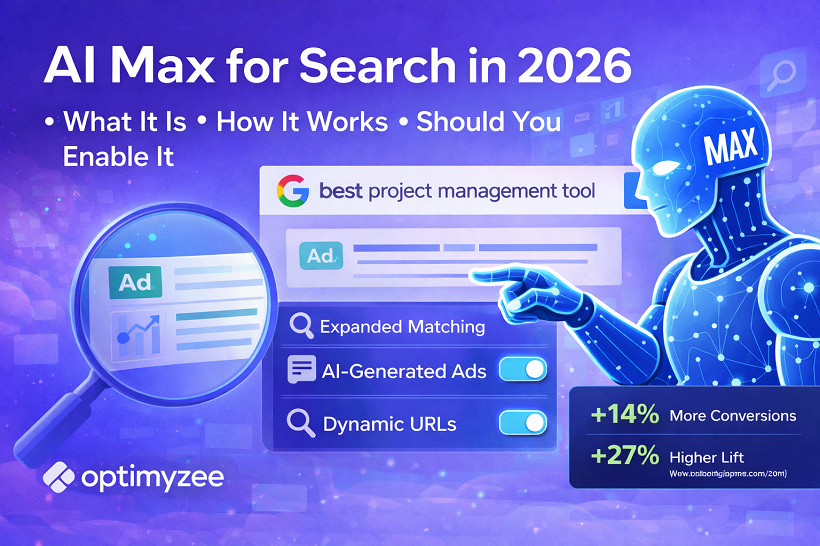
AI Max is a suite of three AI-driven features that you can enable on existing Search campaigns. You can turn them on individually or all at once. They work on top of your existing keywords, ads, and bidding strategy – you don’t need to rebuild anything from scratch.
The three features are:
- Search term matching – expands which queries your ads show for
- Text customization – generates ad copy dynamically based on landing pages and search context
- Final URL expansion – routes users to the most relevant page on your site
Each has meaningful implications for performance, control, and how you manage your campaigns day-to-day. Let’s go through them one by one.
Feature 1: Search Term Matching
This is the biggest change. When AI Max is enabled, your ads can show for search queries that aren’t in your keyword list – as long as Google’s AI judges them to be relevant to what you’re offering.
This goes beyond broad match. It uses a combination of intent modelling, your landing page content, and your existing campaign signals to identify queries with genuine purchase or conversion intent that you might never have thought to target.
A practical example: if you run a campaign for a project management software tool and your keywords focus on “task tracking software” and “team productivity app,” AI Max might match your ad to someone searching “how do remote teams stay organised” – a long, conversational query that reflects real intent but that you’d never write as a keyword.
The important thing for anyone worried about control: negative keywords still apply fully. Whatever you’ve excluded will stay excluded. AI Max works within those boundaries. This is a significant difference from Performance Max, where negative keyword controls have historically been more limited.
Practical tip: Before enabling Search Term Matching, do a thorough audit of your negative keyword lists. The better your exclusions are, the cleaner the expanded traffic AI Max brings in will be.
Feature 2: Text Customization
Google’s AI can now generate headlines and descriptions for your ads dynamically – in real time, based on the user’s specific search query and your landing page content. This builds on what Google previously called Automatically Created Assets (ACAs), but with significantly more control.
The key development that makes this actually usable for brands is Text Guidelines, launched globally in February 2026. Text Guidelines give you two levers:
- Exclusion lists: you can specify up to 25 terms or phrases the AI must never use in generated copy. Useful for brands that need to avoid words like “cheap,” “free,” or any clinical/legal language.
- Natural language instructions: you can write plain-English guidance like “always mention our 30-day money-back guarantee” or “focus on enterprise customers, not consumers.” The AI follows these instructions when generating assets.
Before Text Guidelines existed, the main legitimate objection to text customization was that you couldn’t control what the AI said about your brand. That objection is now largely answered. The AI generates copy you haven’t written, but within guardrails you define.
For business owners running their own campaigns: this reduces the burden of constantly refreshing ad copy. For agencies: it gives you a scalable way to generate relevant, tailored assets at scale without writing every headline manually.
Practical tip: Don’t leave Text Guidelines empty. Spend 20 minutes writing instructions and exclusions before enabling this feature. It makes a meaningful difference in the quality and brand-safety of generated copy.
Feature 3: Final URL Expansion
Instead of always sending ad traffic to the URL you specified, Final URL Expansion allows Google to route users to whichever page on your site best matches their search intent. Someone searching for a very specific product gets sent to that product page. Someone with a broader query might land on a relevant category page.
When this works well, it reduces bounce rates and increases conversion rates – users land exactly where they expected to based on what they searched.
When it doesn’t work well, it’s usually because parts of the site have weak content, slow load times, or poor mobile experience. Google sends traffic to those pages, and it doesn’t convert.
The control mechanism: you can exclude specific URLs from expansion. If there are sections of your site you don’t want traffic hitting – thin content pages, internal tools, pages under construction – you can block them explicitly.
Practical tip: Before enabling URL expansion, run a quick audit of your site’s key landing pages. Any page with high bounce rate, slow speed, or weak CTA should be excluded. This takes an hour to do properly and significantly improves the feature’s performance.
Does It Actually Work? What the Data Shows
Google’s own benchmarks show advertisers enabling AI Max see an average of 14% more conversions at a similar CPA or ROAS. For campaigns primarily using exact and phrase match keywords – where there’s less existing breadth – the uplift is closer to 27%.
Third-party results align broadly. L’Oréal reported a 2x improvement in conversion rate alongside a 31% reduction in cost-per-conversion. MyConnect, a telecoms company in Australia, added 16% more leads while reducing CPA by 13%.
These are real results, but they come with context: they’re from accounts with healthy conversion volumes, well-structured campaigns, and established audience signals. AI Max performs better the more data it has to work with. A new campaign with 5 conversions a month will see different results than a mature campaign with 150.
How to Test It Properly
Google built an experiment mode into the AI Max activation flow. When you enable it, you can run a 50/50 traffic split: half your campaign traffic runs with AI Max, half without. The experiment tracks conversion volume, cost efficiency, and statistical significance automatically.
This is the right way to evaluate it. Don’t enable AI Max across your full account based on Google’s benchmarks alone. Run the experiment for 2–4 weeks, look at your specific numbers, and make a data-driven decision from there.
Results to look for: conversion volume, CPA or ROAS, impression share, and the quality of search terms (check what queries AI Max is matching your ads to – the Search Term Matching insights report shows this).
When AI Max Makes Sense
AI Max is a good fit when:
- Your campaign generates at least 30 conversions per month – the algorithm needs data to optimise effectively
- You’re using Smart Bidding (Target CPA, Target ROAS, Maximize Conversions) – AI Max has limited functionality with Manual CPC
- You’ve hit a performance plateau with your current keyword strategy and want to expand reach without adding broad match across everything
- Your website has consistent quality across pages – URL expansion needs a reliable landing page experience to send traffic to
- You have brand guidelines that you can encode into Text Guidelines
When to Be More Careful
- Brand and competitor campaigns where you need precise query control – consider keeping these on standard keyword targeting for now
- Highly regulated industries (legal, medical, financial) where ad copy compliance is non-negotiable – use Text Guidelines carefully and review generated copy regularly
- Very low-budget or low-volume campaigns – the algorithm won’t have enough signal to learn effectively
- Accounts with incomplete or inaccurate conversion tracking – AI Max will optimise toward whatever you’re measuring, so if your tracking is wrong, the optimisation will be wrong too
Where AI Max Fits in Your Overall Campaign Structure
Google’s current recommended structure pairs AI Max for Search with Performance Max and Demand Gen – what they call the “Power Pack.” Each plays a different role: Demand Gen builds awareness and generates interest at the top of the funnel, Performance Max handles cross-channel conversions across Search, Display, YouTube, and beyond, and AI Max for Search captures high-intent search queries with more granularity and control than PMax offers on Search.
In practice, if you’re already running Performance Max, adding AI Max for Search lets you get better coverage of the Search network specifically – with more transparency into what’s working and more control over exclusions.
If you’re not yet running Performance Max, AI Max for Search is a lower-risk way to start expanding your Search campaign’s reach without the full automation of PMax.
AI Max for Search is the most significant change to Search campaigns in several years. The feature itself is solid; the controls have improved to the point where most of the original objections don’t hold anymore. Test it properly, with the built-in experiment, on campaigns that have enough conversion volume – and you’ll know within a month whether it’s working for your business.